Adaptive mesh refinement with MMG
In a nutshell,
-
Install MMG.
libmmg3d.aorlibmmg2d.ais expected to be available.- With minimal required dependencies, it should be straightforward to build MMG.
-
With
use_mmg = 1inMakefile, remeshing will use MMG for adaptive mesh refinement. -
The following two parameters control the maximum and minimum element size during remeshing. For instance,
mmg_hmax_factor = 10.0: The largest element will have an edge length 10 timesparam.mesh.resolutionmmg_hmin_factor = 0.1: The smallest element will have an edge length 0.1 timesparam.mesh.resolution
-
compute_metric_field()inremesh.cxxis currently hardwired to use plastic strain () to scale element size from to as 1/(1+).- In the future, users should be able to change the factor 10 or the function form itself.
-
Note that since can only increase, the total mesh size will grow with it.
- To maintain a certain mesh size, mesh optimization is needed.
- DES3D is currently hardwired to provide a 'solution' filed see below and thus perform remeshing.
- It should be a user option whether to provide a solution field or not.
Screenshots
examples/core-complex-mmg.cfgparam.mesh.resolution: 1 km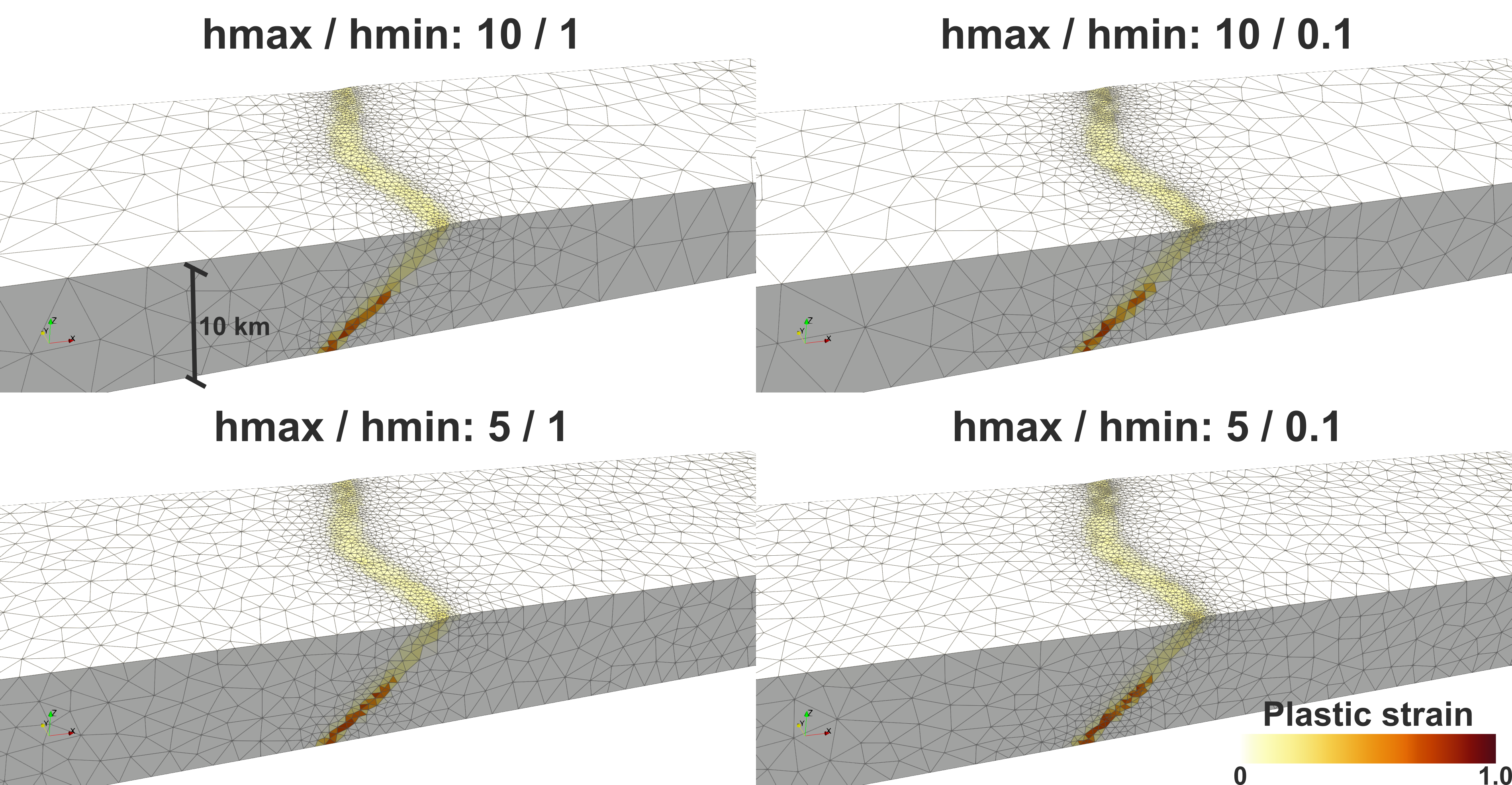
Technical details
Parameters for MMG
mmg_debug: Turn on/off debug mode. In debug mode, MMG checks if all structures are allocated.mmg_verbose: Level of verbosity, -1 to 10.mmg_hmax_factor: Positive number. The maximum possible element size set to behmax * param.mesh.resolutionmmg_hmin_factor: Positive number. The minimum possible element size set to behmin * param.mesh.resolutionmmg_hausd_factor: Global Hausdorff distance (on all boundaries in the mesh). Roughly speaking, allowed difference of the boundary before and after mesh refinement or optimization.
For more MMG parameters, refer to https://mmgtools.github.io/libmmg3d_8h.html#a964a06109019542d04f12263c3fae24d
For instance,
mmg_debug = 0
mmg_verbose = 0
mmg_hmax_factor = 10.0
mmg_hmin_factor = 1.0
mmg_hausd_factor = 0.01
Using MMG for remeshing
One needs to set usemmg to 1 in Makefile:
usemmg = 1
In Makefile, the following build parameters are set:
ifeq ($(usemmg), 1)
        # path to MMG3D header files
        MMG_INCLUDE = $(HOME)/opt/mmglib/include

        # path of MMG3D library files, if not in standard system location
        MMG_LIB_DIR = $(HOME)/opt/mmglib/lib

        MMG_CXXFLAGS = -I$(MMG_INCLUDE) -DUSEMMG
        ifeq ($(ndims), 3)
                MMG_LDFLAGS = -L$(MMG_LIB_DIR) -lmmg3d
        else
                MMG_LDFLAGS = -L$(MMG_LIB_DIR) -lmmg2d
        endif
        ifneq ($(OSNAME), Darwin)  # Apple's ld doesn't support -rpath
                MMG_LDFLAGS += -Wl,-rpath=$(MMG_LIB_DIR)
        endif
endif
ifeq ($(usemmg), 1)
        CXXFLAGS += $(MMG_CXXFLAGS)
        LDFLAGS += $(MMG_LDFLAGS)
endif
When USEMMG is defined during the build process with -DUSEMMG, remesh() function calls optimize_mesh(), not new_mesh().
void remesh(const Param ¶m, Variables &var, int bad_quality)
{
...
#ifdef THREED
#if defined ADAPT || defined USEMMG
optimize_mesh(param, var, bad_quality, old_coord, old_connectivity,
old_segment, old_segflag);
#else
new_mesh(param, var, bad_quality, old_coord, old_connectivity,
old_segment, old_segflag);
#endif
...
optimize_mesh()
Options for the bottom boundary
The option param.mesh.remeshing_option determines what to do to the bottom boundary during remeshing. However, it does not directly control how MMG performs mesh optimization.
/* choosing which way to remesh the boundary */
    switch (param.mesh.remeshing_option) {
    case 0:
        // DO NOT change the boundary
        excl_func = &is_boundary;
        break;
    case 1:
        excl_func = &is_boundary;
        flatten_bottom(old_bcflag, qcoord, -param.mesh.zlength,
                       points_to_delete, min_dist);
        break;
    case 2:
        excl_func = &is_boundary;
        new_bottom(old_bcflag, qcoord, -param.mesh.zlength,
                   points_to_delete, min_dist, qsegment, qsegflag, old_nseg);
        break;
    case 10:
        excl_func = &is_corner;
        break;
    case 11:
        excl_func = &is_corner;
        flatten_bottom(old_bcflag, qcoord, -param.mesh.zlength,
                       points_to_delete, min_dist);
        break;
    case 12:
        flatten_x0(old_bcflag, qcoord, points_to_delete);
        break;
    default:
        std::cerr << "Error: unknown remeshing_option: " << param.mesh.remeshing_option << '\n';
        std::exit(1);
    }
Workflow during remeshing with MMG
- Initialization
- Mesh building in MMG5 format
- Solution (i.e., metric) field building
- When a solution filed is provided, MMG's mesh optimization, re-shaping element respecting the original sizes, does NOT occur. Instead, new elements are created as desired according to the parameters.
- The current default mode in DES3D is to provide a solution field.
- For this purpose, there is a customizable function,
compute_metric_field()inremesh.dxx. More about this function below.
- Mesh optimization
- Mesh-related data update using the optimized MMG5 mesh
compute_metric_field()
This function converts accumulated plastic strain into a per-node metric
(target edge length) that MMG uses to resize elements. The metric for
each element is computed from that element's own current size scaled by
a sizefactor, then clipped to the user-specified bounds:
where
- is the element's own current edge length (not the global
resolution), ensuring the metric is spatially adaptive from the start -
mmg_hmax_factor × resolution -
mmg_hmin_factor × resolution
Element metrics are then volume-averaged onto the nodes to produce the nodal solution field that MMG consumes.
For example, with resolution = 1e3 m, mmg_hmax_factor = 2.0,
mmg_hmin_factor = 0.1:
- where
- while
- once
Using MMG for initial mesh generation
For large 3D models (roughly >5 million elements), TetGen can be slow or crash during the initial mesh generation step. DES3D supports an optional two-stage initialization that uses TetGen to create a coarse seed mesh and then refines it with MMG to the target resolution.
Enable it in your config file:
use_mmg_init = 1
mmg_init_coarsening_factor = 4.0   # TetGen seed is 4× coarser than target resolution
use_mmg_init is only effective when DES3D is compiled with usemmg = 1.
If MMG support is absent, the parameter is silently ignored and the standard
TetGen path is used.
| Parameter | Default | Description |
|---|---|---|
use_mmg_init | 0 | Set to 1 to enable two-stage MMG initialization (requires usemmg = 1) |
mmg_init_coarsening_factor | 4.0 | TetGen generates a mesh N× coarser than the target; MMG then refines it |
Enable use_mmg_init when your 3D model has more than ~2 million target
elements and TetGen initialization takes more than a few minutes or
produces memory errors.